Move: A Free Lightweight Windows Utility to Keep Your PC Awake Without Moving the Mouse
Introducing Move: A Lightweight Windows Utility to Keep Your PC Awake
We've all experienced it.
You start downloading a large file, rendering a video, running a backup, or connected to a Remote Desktop session, only to return later and discover that Windows decided it was time to go to sleep.
While there are plenty of applications that claim to solve this problem, many rely on constantly moving your mouse or simulating keyboard input. Although effective, these approaches can interfere with presentations, games, remote sessions, or applications that monitor user activity.
That's why I created Move.
What is Move?
Move is a lightweight Windows system tray application that prevents your computer from sleeping by using the official Windows power management API.
Instead of pretending you're active by moving the mouse every few seconds, Move communicates directly with Windows through the native SetThreadExecutionState() API—the same mechanism Microsoft provides for applications that legitimately need to keep a computer awake.
The result is a clean, efficient, and reliable solution that works quietly in the background without disrupting your workflow.
Why I Built It
As a developer, I frequently leave my computer running overnight for long tasks such as:
Downloading large files
Uploading backups
Running Python scripts
Rendering videos
Maintaining Remote Desktop sessions
Testing applications
Monitoring servers
Too often I'd come back to find the computer asleep, the display turned off, or the task interrupted.
I wanted something that simply worked.
No complicated settings.
No unnecessary features.
No fake mouse movement.
Just a tiny utility that tells Windows to stay awake.
Features
Move focuses on simplicity while providing everything most users need.
Lightweight and Fast
Move runs quietly in the Windows notification area (system tray) and consumes very little CPU and memory.
Official Windows API
Instead of simulating activity, Move uses the native Windows SetThreadExecutionState() API to prevent:
System sleep
Display sleep
This makes it more reliable than traditional "mouse jiggler" applications.
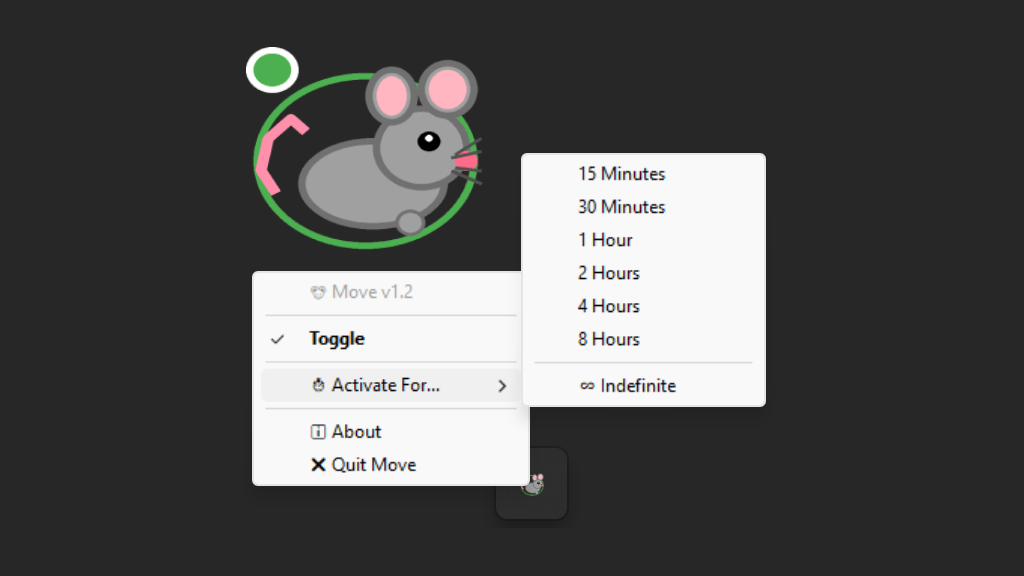
Built-in Timer
Need your PC awake for only a short time?
Move includes several timer presets:
15 Minutes
30 Minutes
1 Hour
2 Hours
4 Hours
8 Hours
You can also enable Unlimited Mode to keep your computer awake until you manually turn it off.
Automatic Activation
Once launched, Move immediately begins keeping your system awake, so there's nothing else to configure.
Simple System Tray Interface
Everything is accessible with a single right-click:
Toggle On/Off
Timer selection
About dialog
Quit application
No large windows.
No complicated menus.
Just one small tray icon that stays out of your way.
Built with Python
Move is written entirely in Python using a small collection of libraries:
Python
pystray
Pillow
ctypes
The application communicates directly with Windows through the native API, keeping the project lightweight while avoiding unnecessary dependencies.
Perfect For
Move is useful in many everyday situations:
Software developers
IT administrators
Remote workers
Students
Content creators
System administrators
Anyone downloading large files
Anyone giving presentations
Anyone running long tasks
If your computer needs to stay awake for hours, Move can help.
Download Move
Move is completely free to use.
Open Source
Move is completely open source :
Github repo : https://github.com/essarouri/Move/
If you're interested in Python, Windows desktop development, or simply want to improve the application, contributions, suggestions, and feedback are always welcome.
Whether you'd like to report a bug, suggest a feature, or submit a pull request, I'd be happy to hear from you.
Final Thoughts
Move was born from a simple idea: solve one problem and solve it well.
Instead of trying to become another all-in-one system utility, Move focuses on one task keeping your Windows computer awake and does so using the method recommended by Microsoft.
If you're looking for a lightweight, reliable, and unobtrusive way to prevent Windows from sleeping, give Move a try.
I hope it saves you from interrupted downloads, paused renders, disconnected remote sessions, and the frustration that inspired this project in the first place.
Sometimes the best software is the software you barely notice—and that's exactly what Move aims to be.